For Magic: The Gathering players
Your Magic collection, your decks and the rules, for the AI assistant you already use.
The Vault keeps your cards and decks. Connect Claude, ChatGPT or another assistant you use, and ask in plain words: what can I build, what should I buy, what does this card do, is my deck legal? Every answer shows where it came from.
Sign in with Google, Microsoft, Apple, Facebook or a passkey. Your collection stays private.
How it works
-
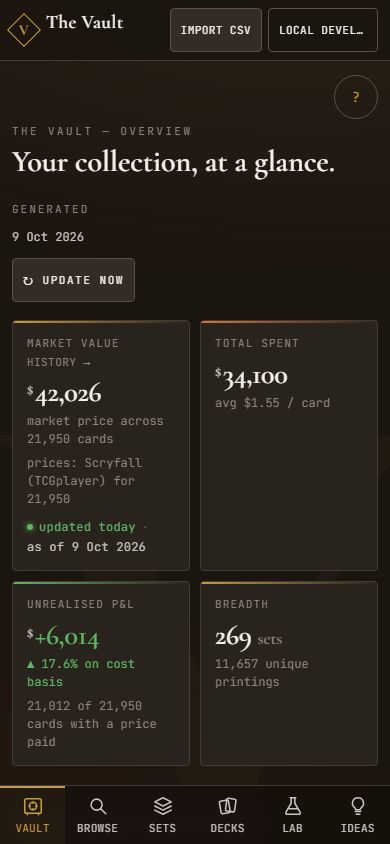
1. Bring your collection
Import the CSV from Dragon Shield or Moxfield, or any list with card, set and number. The Vault matches every card, prices it every day and keeps your decks next to it.
-
2. Connect your assistant
Add the Vault to the assistant you already use, with one address. You sign in with your Vault account and choose what it may do: read only, or also make changes after asking you. Step by step.
-
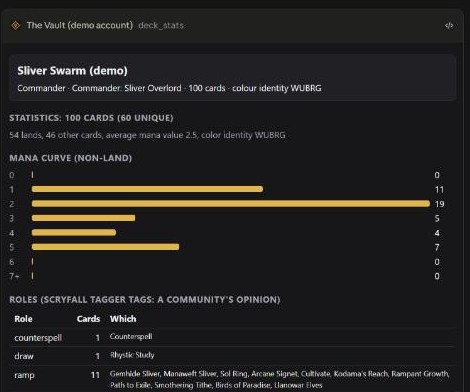
3. Ask it things
Deck odds, what to buy to finish a deck, what a card really does, whether a deck is legal. The answer comes from your own cards and the real rules text, with the sources shown.
Try asking
- “What are my five most valuable cards?”
- “Is my Sliver deck legal in Commander? What am I missing, and what does it cost to finish?”
- “Review my deck with the expert council. I want to tune it.”
- “Which cards I own could stand in for the one I am missing?”
Works with the assistant you have
Each one tested for real in that app, with the Vault answering from your own collection.
- Claude (web)Tested
- ChatGPT (web)Tested
- ChatGPT (desktop app)Tested
- Perplexity (web)TestedNeeds a plan with custom connectors (tested on Pro).
Add it by hand, for now
A listing in the Claude and ChatGPT directories is coming. Until then, add the Vault as a custom connector: it takes a minute, and the address is the same everywhere.
Claude
In Claude (web, desktop or mobile): Settings → Connectors → Add custom connector, name it The Vault and paste this address:
Open Claude's Add custom connector dialog, filled in
Claude first shows a red notice that the connector came from an external link. That is expected: check that the name is The Vault and the address is https://mtgvault.cards/api/mcp, then press Continue. Seen on a real account on 2026-10-10.
https://mtgvault.cards/api/mcpThen sign in on the Vault's page and approve. Write is already ticked there because the assistant asks for it: it lets the assistant change your collection and decks, deleting decks and replacing the whole collection included. Untick it to keep the assistant read-only. A listing in Claude's directory is coming; this page will show the button.
After a Vault update that adds tools: disconnect and connect The Vault again, so Claude reads the new tools.
ChatGPT
In ChatGPT: Plugins → Add → Add custom MCP server, name it The Vault, paste this address and keep OAuth:
https://mtgvault.cards/api/mcpThen sign in on the Vault's page and approve. Write is already ticked there because the assistant asks for it: it lets the assistant change your collection and decks, deleting decks and replacing the whole collection included. Untick it to keep the assistant read-only. A listing in ChatGPT's directory is coming; this page will show the button.
After a Vault update that adds tools: ChatGPT reads the tools only when the app is added: delete it (not only uninstall) and add it again.
Perplexity
- In the Perplexity web app open Connectors (https://www.perplexity.ai/computer/connectors) and choose Custom connector (Remote), then Add MCP connector. It needs a plan that offers custom connectors (the check ran on Pro).
- Name it The Vault, leave the description optional, set the MCP server URL to https://mtgvault.cards/api/mcp, leave the advanced settings as they are, tick that you understand custom connectors can introduce risks, and add it.
- Open the connector and press Add connector. Perplexity opens the Vault's page "Connect Perplexity (www.perplexity.ai) to your Vault?": sign in (a passkey, Google and so on; the page shows who is signed in) and press Allow.
- The connector then shows Connected with the Vault's tools, each with a permission: Disable, Always ask or Allow.
- Use it in Computer mode and mention the Vault in your question, for example "Using the Vault, what are my most valuable cards?". The connector shows Perplexity's plain plug icon, because Perplexity has no icon field for custom connectors.
https://mtgvault.cards/api/mcpSeen in a real run on 2026-10-09 on a Pro plan; the documentation of Perplexity was not used. Comet (Perplexity's browser) was not looked at: not verified yet.